The Future of Web Design: How AI Is Transforming Creativity and Digital Experiences
The world of web design is changing faster than ever. New artificial intelligence tools are helping designers, developers, and creative professionals build websites, create visual content, generate ideas, and improve digital experiences in less time.
However, AI is not simply replacing traditional design tools. Instead, it is becoming a powerful assistant that helps professionals work faster, explore more ideas, and focus on creativity and strategy.
In this article, we explore how AI is transforming web design, graphic design, and digital content creation—and what designers can do to stay ahead.
- How AI Is Changing Web Design
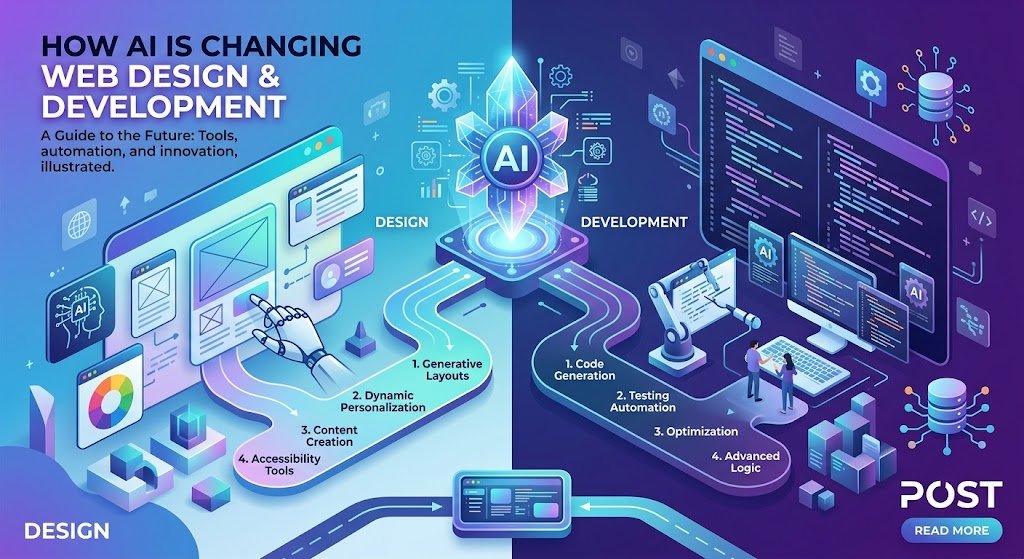
Artificial intelligence is becoming part of many stages of the website development process.
AI-powered tools can help with:
- Website planning
- Content generation
- UI/UX ideas
- Layout creation
- Image generation
- Code assistance
- SEO optimization
- Accessibility improvements
- Website testing
- Performance analysis
Instead of starting every project from scratch, designers can use AI to create an initial concept and then refine it using their own expertise.
This creates a faster workflow without removing the human role from the design process.
- AI as a Design Assistant
One of the most useful ways to use AI is to treat it as a creative assistant rather than a replacement for the designer.
For example, a web designer can ask AI to generate:
- Homepage concepts
- Color palette suggestions
- Typography combinations
- Website section ideas
- User journey concepts
- Content structures
- SEO-friendly headings
- Calls to action
- Product descriptions
The designer can then evaluate these ideas and decide what actually works for the project.
The important skill is not simply knowing how to generate content with AI. It is knowing how to evaluate, improve, and apply AI-generated ideas effectively.
- AI-Powered Website Development
AI coding assistants are also changing how websites and web applications are built.
Modern AI tools can assist with technologies such as:
- HTML
- CSS
- JavaScript
- React
- Next.js
- TypeScript
- Tailwind CSS
- WordPress
- PHP
A designer or developer can describe a feature in natural language and use AI to create an initial implementation.
For example:
“Create a responsive portfolio section with six project cards, category filters, hover animations, and a mobile-friendly layout.”
AI can generate a starting point that the developer can then review, test, modify, and optimize.
This approach is becoming especially useful for vibe coding, where developers communicate their desired functionality and interface through natural language while AI assists with implementation.
- AI and WordPress
WordPress professionals can also benefit from AI-powered workflows.
AI can assist with:
- Website structure
- Page content
- Blog articles
- SEO metadata
- Product descriptions
- Landing pages
- CSS customization
- Troubleshooting
- Plugin configuration ideas
- Content planning
For WordPress designers, the combination of WordPress, AI tools, and visual design platforms can significantly accelerate the development process.
However, every AI-generated change should be reviewed before being published on a production website.
- AI in Graphic Design
AI is also transforming graphic design.
Designers can use AI tools to explore concepts for:
- Social media graphics
- Brand visuals
- Posters
- Advertisements
- Presentations
- Website banners
- Illustrations
- Marketing campaigns
- Product visuals
Instead of spending hours creating every concept manually, designers can generate multiple directions quickly and select the most promising one for further refinement.
This allows more time for creative decisions, branding, composition, typography, and communication.
- AI-Generated Images and Visual Content
Image-generation technology has become an important part of the modern creative workflow.
Designers can use AI to create visual concepts from text descriptions.
For example:
“Create a modern technology workspace with a laptop, abstract digital interface, soft lighting, and a professional blue-and-white visual style.”
The generated image can become a starting point for a website hero section, social media campaign, presentation, or creative concept.
But professional designers should still consider composition, brand consistency, image quality, licensing requirements, and the specific needs of the project.
- AI and SEO
AI can also support search engine optimization.
It can help designers and content creators develop:
- Keyword ideas
- SEO titles
- Meta descriptions
- Blog outlines
- Content structures
- FAQ sections
- Internal linking ideas
- Content optimization suggestions
However, SEO should not become a process of producing large amounts of generic AI-generated content.
High-quality websites still need useful, original, accurate, and relevant information that provides value to visitors.
AI should help improve the workflow—not replace the need for quality.
- Why Human Creativity Still Matters
AI can generate impressive results, but human creativity remains essential.
A successful website requires more than generating code or images.
A professional designer must understand:
- The target audience
- Business objectives
- Brand identity
- User experience
- Visual hierarchy
- Accessibility
- Content strategy
- Conversion goals
AI can generate possibilities, but humans make the final creative and strategic decisions.
This is why the future of design is likely to involve human creativity supported by artificial intelligence rather than AI working completely independently.
- Skills Designers Should Develop
As AI becomes more common, designers should focus on skills that allow them to use these technologies effectively.
Important skills include:
Web Design
Understanding responsive layouts, typography, UI/UX, accessibility, and modern design systems remains essential.
WordPress Development
Knowledge of WordPress, themes, plugins, Elementor, WooCommerce, SEO, and website performance can help designers create complete digital solutions.
AI Tools
Designers should learn how to use AI for research, ideation, content creation, image generation, coding assistance, and productivity.
Prompt Engineering
Knowing how to communicate clearly with AI can significantly improve the quality of generated results.
Branding
AI can generate visual concepts, but designers need to understand brand identity, consistency, color systems, typography, and visual communication.
Critical Thinking
Perhaps one of the most important skills is knowing when AI-generated output is useful—and when it needs to be changed or rejected.
- The New Designer Workflow
A modern designer’s workflow can combine traditional design skills with AI assistance.
A typical project might look like this:
Step 1 — Research
Understand the client, audience, competitors, and business goals.
Step 2 — Planning
Create the sitemap, content structure, user journey, and project requirements.
Step 3 — AI-Assisted Ideation
Use AI to generate concepts, layouts, copy ideas, and creative directions.
Step 4 — Design
Create the visual system, wireframes, UI, graphics, and responsive layouts.
Step 5 — Development
Build the website using WordPress, HTML/CSS/JavaScript, React, Next.js, or another suitable technology.
Step 6 — Optimization
Improve performance, accessibility, SEO, responsiveness, and user experience.
Step 7 — Human Review
Check every important element before launching the website.
Step 8 — Launch and Improve
Monitor the website and continue improving it based on real user behavior and business requirements.
- AI Is a Tool, Not the Strategy
One of the biggest mistakes is assuming that using more AI automatically creates better results.
It does not.
A successful digital project starts with a clear strategy.
AI can help you execute ideas faster, but it cannot replace the need to understand why a website exists, who it serves, and what users need to accomplish.
The strongest workflow is therefore:
Strategy → Creativity → AI Assistance → Human Review → Optimization
This approach combines technology with professional expertise.
- The Future of Web and Graphic Design
The future of digital design will likely become increasingly collaborative between humans and AI.
Designers will spend less time performing repetitive tasks and more time working on:
- Strategy
- Creativity
- User experience
- Branding
- Problem solving
- Innovation
- Client communication
At the same time, professionals who understand both design and technology will have more opportunities to build complete digital experiences.
The designer of the future may not be limited to creating visual layouts. They may also plan the website, generate content, build components, optimize SEO, create marketing assets, analyze performance, and use AI to accelerate the entire process.
Conclusion
Artificial intelligence is changing the way websites, graphics, and digital content are created.
For web designers, WordPress developers, graphic designers, and content creators, AI can become a powerful productivity and creativity tool.
The goal should not be to let AI do everything.
Instead, the goal is to combine human creativity, technical knowledge, design thinking, and AI-powered tools to create better digital experiences.
The professionals who learn how to work effectively with AI while maintaining strong creative and technical skills will be better prepared for the future of digital design.
AI is changing the tools we use—but creativity, strategy, and human decision-making remain at the center of great design.